Flight School Student Management
Every student in one searchable overview: report cards, documents and settings, for one student or a whole group. Student management is one part of OY Wings, our complete flight school management software.
Your students, shown the way you work
Search across all your students in one place, and set up the list to show what you need to see.
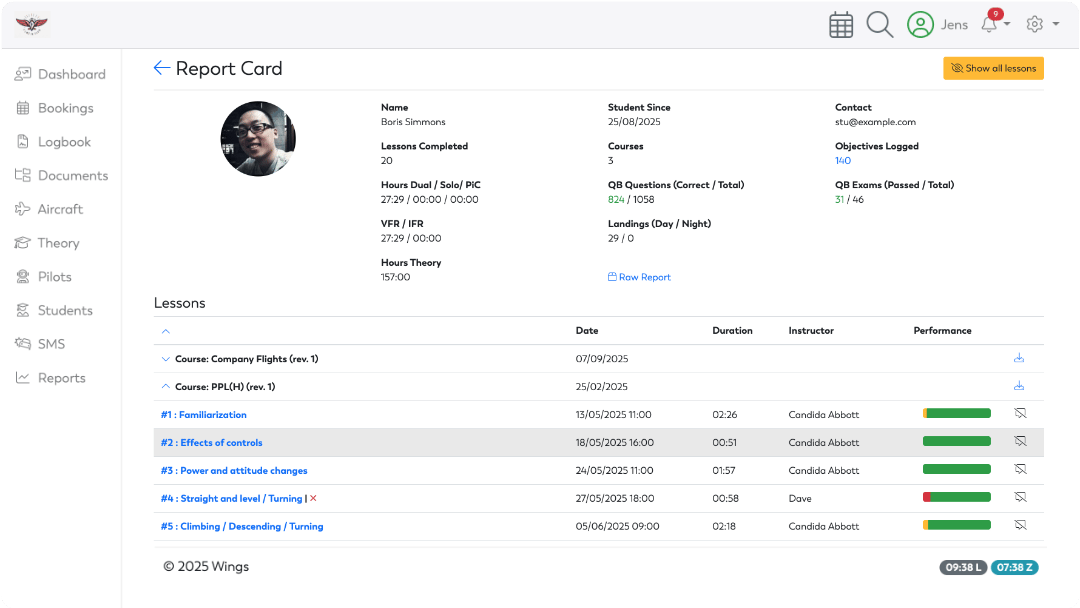
Clear Report Card
From the student overview, you open each student’s record: update details, check documents, or go straight to the report card. The report card shows the student’s progress, current course status and any areas of concern.
Instructors and staff can see where each student stands.
The training records EASA asks for
EASA’s rule for approved training organisations, ORA.ATO.120, says these records must be kept throughout the course and for three years after the training is completed: details of the ground, flight and simulated flight training given to each student; instructors’ progress reports and assessments, progress flight tests and ground examinations; and the student’s licences, ratings and certificates, including the expiry dates of medical certificates and ratings.
In OY Wings, every competency assessment is timestamped and version controlled, and courses have full revision control. When you update a syllabus, earlier competency assessments stay as they were.
Everything about a student, in one record
Report card
Progress against the course and its lesson plans, with clear indicators of where each student is.
Theory results
Results from the Theory Question Bank show on the same report card.
Competencies
With CBTA, every assessment adds to a complete history of the student’s development.
Documents, medicals and currency
Students manage their own documents, and medical certificates and currency are tracked for each student.
Your own courses
Build your own courses and lesson plans, including type rating programmes.
On the airfield and in the briefing room
Students and instructors use the OY Wings app on iPhone: the next lesson, bookings and currency on one screen. On iPad, every student’s progress and the lesson being graded sit on one large screen, so you can talk it through. The apps are free for OY Wings customers, with your existing account.
Questions about student management
How long must an ATO keep training records?
Throughout the course and for three years after the training is completed, according to EASA’s ORA.ATO.120. In OY Wings, competency assessments are timestamped and version controlled, and the report card keeps the full history.
Can students see their own progress?
Yes. Students see their whole training in one place, and on iPhone they see their next lesson, bookings and currency.
Does it work for helicopter training?
Yes. Sloane Helicopters, a helicopter ATO in the UK, uses OY Wings.
Can we build our own courses, including type ratings?
Yes. You build your own courses and lesson plans, including type rating programmes.
Is student management included in the price?
Yes. Every module is included for every customer, at one price per active user. See the price.
Also included in the price
Every module is included in the price:
Your next step
The next step is a 45-minute intro call with Pete. Ask all the questions you have, see the software, and hear exactly what happens next. Prefer to write? Choose Contact us above.