


Every flight school knows the Friday afternoon scheduling session at the whiteboard: next week's lessons in marker, a magnet for each instructor, and sticky notes for everything that could go wrong. A medical that runs out on Wednesday. An instructor who has asked for Thursday off. A student who cannot fly solo until a lesson is signed off. Planning in OY Wings schedules that week in one click, with every rule checked.
Planning is coming soon to OY Wings, and it brings automatic scheduling to flight training. Operations make a plan for up to two weeks, fill it with lessons for every student, instructor and aircraft, adjust it on a drag-and-drop planning board, and publish it as bookings. Here is a first look in 60 seconds:
Automatic Scheduling: The Whole Week, Filled at Once
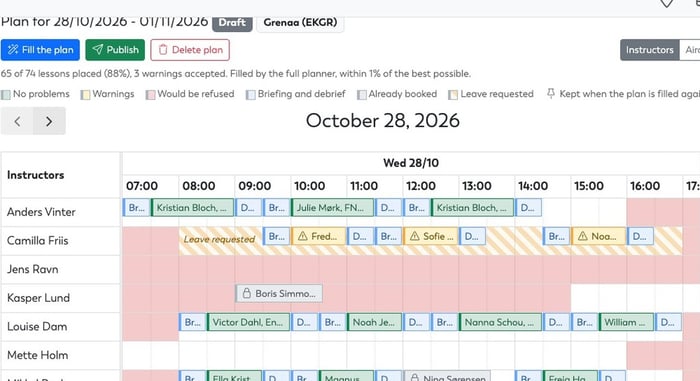
Fill the plan works out what every student needs next: the next lesson on each course they are on, and more than one when they have a target of several lessons a week. Then OY Wings looks for the best combination of times, instructors and aircraft across everyone at once, around the bookings already on your calendar. Student, instructor and aircraft scheduling are solved together, not one after another.
- Fair
Students who have waited longest, who are behind their target or who have a priority boost are placed first, and students in a team move through the course together. - Your preferences
Keeping a student with their instructor, spreading instructor and aircraft hours, fewer aircraft changes: you decide how much each one counts. An aircraft close to its next service gets fewer lessons. - Clear about the result
The summary says how many lessons were placed out of how many were asked for, and how close the plan is to the best one possible for your preferences.
Every Scheduling Rule, Checked
A schedule is only useful if it can actually be flown. Every lesson is checked against the same rules as any booking in OY Wings:
- Ratings and medicals, checked on the day of the booking, not today: a medical that runs out next Tuesday stops counting from next Tuesday
- The right aircraft, such as an IFR-equipped aircraft for the instrument lessons
- Availability and leave, with leave that has been asked for but not yet decided shown on the board
- Flight time limitations, counting the other lessons in the same plan (see FTL and duty)
- Time between bookings, so instructors get a break and aircraft a turnaround
- A free classroom for every briefing and debrief, if you want one
Requirements are built from simple conditions, such as holds a Class 2 medical or better or has passed the lesson before, and the EASA PPL(A) and PPL(H) courses come with theirs filled in. Check by check, you choose whether a problem is ignored, gives a warning or blocks.
Every Unscheduled Lesson, Explained
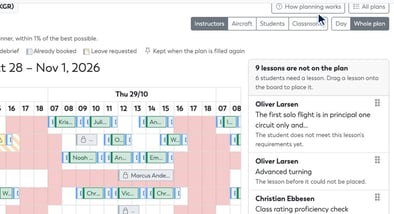
When a lesson cannot be scheduled, it is not quietly dropped. Not on the plan lists every lesson left off, with the reason: every free time is already taken, the lesson before it could not be placed, or the student does not meet the lesson's requirements yet.
Before anything is left off, it is tried again at every other time and with every instructor and aircraft, using the same check the board makes when you move a lesson by hand. You will not find a free spot by hand that the plan missed.
Still Yours to Change: A Drag-and-Drop Planning Board
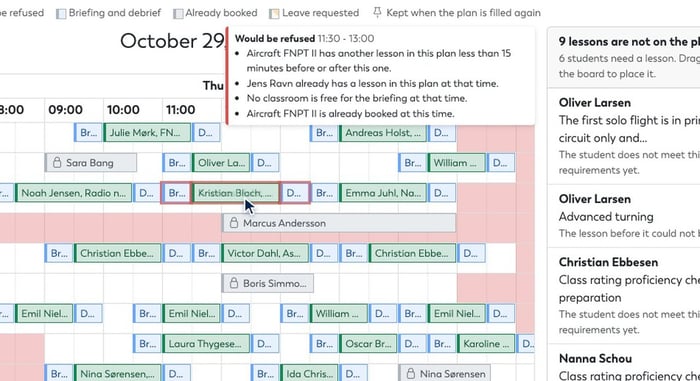
Drag any lesson to another time, instructor or aircraft. While you drag, the board shows what the checks would find at that spot, as No problems, Warnings or Would be refused, with every reason in plain language.
- Lessons you move by hand stay where you put them when you fill the plan again
- Where you are allowed to, go ahead despite a check and give a reason, which is recorded
- Drag a lesson from Not on the plan straight onto the board
Scheduling One Student: The Best Times, Ranked
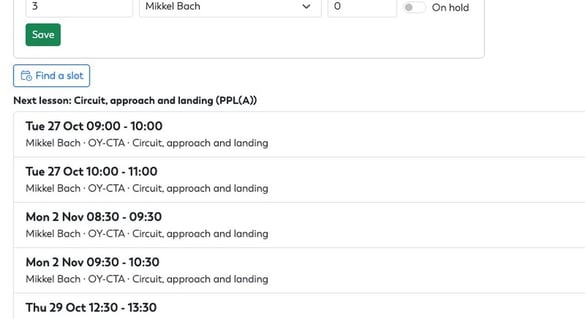
Not every scheduling question is a whole week. Find a slot answers "when can Anna fly her next lesson?". It works out the lesson she needs next, finds times when an instructor, an aircraft and Anna are all free, runs each one through your checks, and ranks the best few: her preferred instructor and times, even hours across the fleet, the aircraft she flew last. One click books the lesson, with its lesson plan.
Publish the Schedule, and Everyone Is Told
Publish turns the plan into bookings on your calendar, every lesson in one go, each with its briefing, debrief, classroom and lesson plan. Every lesson is checked again first, against the bookings that exist at that moment, and everyone involved is told about their new bookings. If you prefer, published bookings can wait for a member of staff to approve them.
Flight School Scheduling: Common Questions
What does flight school scheduling software do?
It builds the schedule of lessons for students, instructors and aircraft, instead of someone working it out by hand on a whiteboard or in a spreadsheet. Planning in OY Wings fills up to two weeks at a time, checks every lesson against your school's rules, and publishes the result as bookings.
How far ahead can I plan?
A plan covers up to 14 days, starting on any day you choose.
Does planning replace the booking calendar?
No. A plan is a draft until you publish it, and publishing books its lessons on the same calendar as every other booking. Bookings already on the calendar are never moved.
Can instructors see the plan?
Yes, read-only. Operations make, fill, change and publish plans.
Does it work for a school with more than one base?
Yes. A plan can be made for one location, and then takes only that location's students, instructors and aircraft.
Which courses does it work with?
Planning schedules the next lessons on whatever courses your students are on. The EASA PPL(A) and PPL(H) courses come with their requirements filled in, and you can build requirements for any course from simple conditions.
Coming Soon
Planning arrives in an upcoming release of OY Wings. Want to see it schedule a week at your school? Until then, see how scheduling and availability and course and lesson tracking work in OY Wings today.
👉 Watch the planning teaser on YouTube