


Every defect has a story: a crew notices it, someone decides what it means for the aircraft, the work gets done and signed off. Until now, too much of that story lived on paper and in people's heads. OY Wings 1.111 puts the whole of it on the record.
This release brings a rebuilt maintenance workflow, new compliance reports with a year of trends at a glance, safety reporting ready for the authority, and meters that match the aircraft. Here is the release in 90 seconds:
Every Defect, From Report to Release
Maintenance in OY Wings now follows a defect from the moment it is spotted to the moment the aircraft is back in service, and every step leaves a record.
- Asked after every flight
Crews answer the defects question when they complete a flight. "None" is recorded too, so the defect log accounts for every session. - The next crew is told
Open defects appear on the booking form, the lesson start checklist and the rental report, so nobody walks out to an aircraft unaware. - Deferrals with limits
Defer to MEL categories B, C and D, or to a meter reading. Every deferral carries an operational restriction that every crew sees, and the aircraft grounds again automatically when it lapses. - Work orders that mean something
Tasks, labour logged against each task, and a work order that locks for sign-off, so the reviewer approves exactly what was handed over. - One click from the problem
Raise a work order straight from a defect or a service reminder, and completing it releases the defects it fixed and schedules the next service.
Crews can also record when a defect cost training time.
The Figures an Audit Asks For
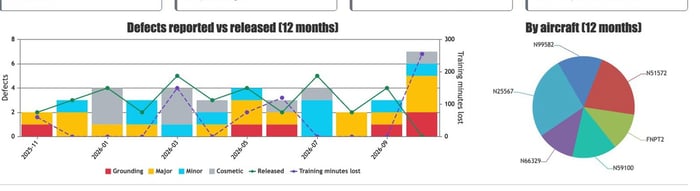
New compliance reports answer the questions a compliance monitoring review or a safety review actually asks, with twelve months of trends rather than a single snapshot.
- Defect Trends - defects reported against released, time to rectify, repeat defects and the training time lost to them
- Fleet Airworthiness - the live position of every aircraft, read across the whole fleet at once
- Maintenance Activity - work orders raised and closed, how long they took, labour and parts per aircraft
- Occurrence Trends - occurrences by month, with the reporting rate per 1000 flight hours
- Reporting Compliance and Corrective Actions - whether reports went out on time, and whether anything is being done about them
Safety Reporting, Ready for the Authority
Safety settings now have their own tab, and occurrence reporting follows EU 376/2014 stage by stage.
- Set your own deadlines for the initial, follow-up and final reports, or switch a stage off
- Record each submission, to whom and how it was sent
- Generate E5X files for ECCAIRS, with a preview of exactly what will reach the authority before you upload it to their portal
Meters That Match the Aircraft
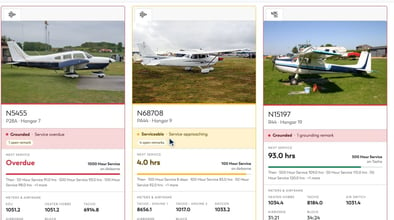
Every aircraft now carries the meters it actually has, and on a multi-engine aircraft they are read once per engine, because each engine keeps its own clock.
- Redesigned aircraft cards answer four questions at a glance: can it fly, when is the next service, what do the meters read, and when was it last used
- A tech-log style aircraft log shows every flight, meter and oil uplift, with fuel and oil per block hour so a rising consumption stands out
- Invoice timers bill on block time, airborne time or any fitted meter, and on aircraft shared with you, you set your own prices and timers
Help, Built In
A new in-app help centre brings 52 guides, written for each role and one click from every page, from setting up your organisation to closing a work order.
Available Now
OY Wings 1.111 is included for every OY Wings customer. Maintenance management and E5X export are switched on in your organisation settings.